
Wireless Adapter Pentesting: Chipsets and Hardware
For wireless adapter pentesting, your laptop card is not enough. First, it has no monitor mode. Also, it cannot inject packets. So you need a USB wireless adapter. However, the chipset matters most. So pick one Kali supports. Otherwise you waste hours on drivers.
What a Wireless Adapter for Pentesting Needs
First, a wireless adapter for pentesting needs three things. In short, they are:
Monitor mode. So it reads every 802.11 frame.
Packet injection. So it can send deauth frames.
Band support. For example, dual-band reaches more networks.
First, monitor mode shows all traffic. So without it, you see only broadcasts. Next, injection drives active attacks. Also, a 2.4 GHz card misses most networks. So pick dual-band. For Wi-Fi 6E, add 6 GHz.
Recommended Chipsets
The chipset decides if a wireless adapter works. First, the MediaTek MT7612U is the best pick on Kali. Also, the mt76 driver supports it. So monitor mode and 5 GHz just work.
Next, the Realtek RTL8812AU is the old workhorse. However, it needs its own driver. Luckily, Kali ships it. So it works well too.
Also, the Realtek RTL8814AU drives the Alfa AWUS1900. It also has four antennas. So it is best for range.
Finally, avoid these chipsets:
First, Intel AX series. It cannot inject.
Next, Broadcom. Its Linux support is poor.
Also, Ralink RT2870 and RT3070. They are old and slow.
Recommended Hardware
First, the Alfa AWUS036ACM adapter uses the MT7612U chipset. Next, it is dual-band and USB 3.0. So it is the default pick. Also, the driver loads on its own.
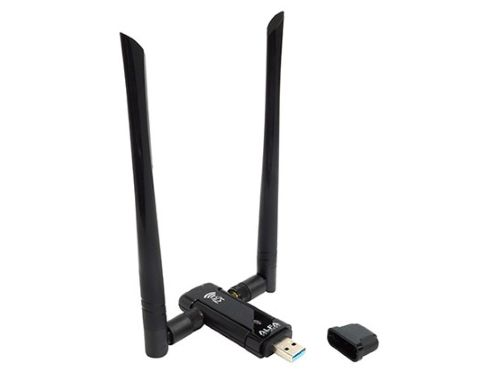
Alfa AWUS036ACHM 802.11ac WiFi Range Boost USB Adapter
Next, the Alfa AWUS036ACHM adapter uses the same MT7612U chipset. Also, it adds a higher-gain antenna. So this adapter suits long-range work.
ALFA Network AWUS036ACM Long-Range Wide-Coverage Dual-Band AC1200 USB Wireless Wi-Fi Adapter w/High-Sensitivity External Antenna - Windows, MacOS & Kali Linux Supported
Also, the Alfa AWUS036ACH adapter uses the RTL8812AU chipset. It is also common in labs. Then the driver ships with Kali. So this adapter works right away.
ALFA AWUS036ACH Long-Range Dual-Band AC1200 Wireless Wi-Fi Adapter w/2x 5dBi External Antennas
For range, the Alfa AWUS1900 adapter uses the RTL8814AU chipset. Also, it has four antennas. So it gives the strongest signal. However, this adapter is bulky.
Finally, the small Alfa AWUS036ACS adapter suits travel. Also, it is dual-band. However, its injection is a bit weaker.
ALFA Network AWUS036ACS Wide-Coverage Dual-Band AC600 USB Wireless Wi-Fi Adapter
Verify the Wireless Adapter
First, plug in the wireless adapter. Then confirm Kali sees it:
Bus 001 Device 003: ID 0b05:17d1 MediaTek MT7612U 802.11a/b/g/n/ac
Next, check it has a wireless interface:
phy#1
    Interface wlan1
        ifindex 4
        addr 00:c0:ca:xx:xx:xx
        type managed
        channel 6 (2437 MHz)
Finally, confirm injection works:
wlan1 channel: 6
Trying broadcast probe requests...
Injection is working!
If injection fails, reload the driver. First, see the driver management guide.
Running in a VM
Sometimes Kali runs in a VM. Then you must pass the adapter through to it. First, in VirtualBox, open Devices > USB. Then in VMware, use VM > Removable Devices. After that, run lsusb in Kali.
Also, USB 3.0 cards need the USB 3.0 controller on. However, a VM adds timing issues. So bare-metal Kali is safer. For more, see the monitor mode guide.
Related


References
-
Aircrack-ng — Compatible Adapters and Driverswww.aircrack-ng.org/doku.php?id=compatibility_drivers (opens in new tab)
Chipset and injection support reference
-
aircrack-ng/rtl8812au on GitHubgithub.com/aircrack-ng/rtl8812au (opens in new tab)
RTL8812AU DKMS driver for Kali
Was this helpful?
Your feedback helps improve this page.