
Picture in Picture Adware: The Chrome Tab Hijack
Created July 15, 2026 • Last updated September 12, 2026 • 6 min read • 2,837 views

More than 200,000 people trust this extension. Then one morning a tab opened on its own. It landed on a random color-picker site, with no click. That is the Picture in Picture adware we reversed for this post.
The extension is Picture in Picture, a popular floating-video tool. So a self-opening tab is a red flag. In response, we pulled the build off disk and read the code. Below, this Picture in Picture adware analysis walks through the redirect, the forensics, and the indicators of compromise.
TL;DR
First, here is the short version. Details follow below.
What: A Picture in Picture build (
nalkmonnmldhpfcpdlbdpljlaajlaphh, v1.6.7) opens a hidden tab on every update. That ID is the official Chrome Web Store listing, and the files carry valid Web Store signatures.Behavior: On install and update, it opens a vendor page. Then the vendor server redirects that tab to a monetized site.
The chain:
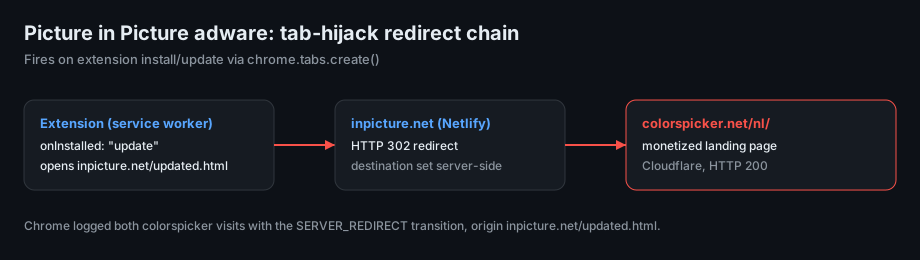
inpicture.net/updated.htmlreturns HTTP 302. Next it points tocolorspicker.net/nl/. Chrome logged both hops asSERVER_REDIRECT.Server-side control: The word "colorspicker" appears nowhere in the code. Therefore the vendor picks the target on its own server. As a result, it can change any day.
Telemetry: In addition, it sends a
POSTtoinpicture.net/versionon each install and update.Not a stealer: In this build there is no credential theft, no keylogging, and no data export. So this is adware, not spyware.
Capability risk: However, it still holds
<all_urls>access and injects into the pageMAINworld. A future signed update could ship a worse payload through the same door.Reach: Chrome shows 200,000 users. Meanwhile the Edge build ("Floating Player") shows another 105,056 installs.
Privacy claim: The listing states it "will not collect or use your data." Yet the telemetry ping contradicts that.
Read on for how we found each fact.
Background: why a Picture in Picture adware flag matters
Picture in Picture is a simple tool. It pops a video into a floating window that stays on top. Therefore it needs broad access to pages with video. That access is normal for the job. Still, it also makes the extension a handy adware vehicle.
A trusted extension that opens tabs on its own is the interesting case. Either a clone wears the brand, or a real listing now carries unwanted code. Both patterns show up in extension supply-chain abuse. Google documents this risk in its extension quality guidelines. As a result, we treat the popup as a lead, not a verdict.
Where the files live
The extension sat in the Chrome profile on disk. The exact path depends on your operating system. On macOS, for example, check here:
~/Library/Application Support/Google/Chrome/<Profile>/Extensions/nalkmonnmldhpfcpdlbdpljlaajlaphh/
Each version lives in its own subfolder, such as 1.6.7_0/. Notably, the _metadata/verified_contents.json file holds Google's signature. That signature matched. So this is published code, not a local edit.
How the Picture in Picture adware opens a tab
The payload is small and readable. First, the service worker registers an onInstalled handler. On install it opens one page. On update it opens another. Here is the core:
// nalkmonnmldhpfcpdlbdpljlaajlaphh/1.6.7_0/serviceWorker.js
chrome.runtime.onInstalled.addListener((e => {
  const s = "https://inpicture.net";
  "install" === e.reason
    ? chrome.tabs.create({ url: `${s}/installed.html` })
    : "update" === e.reason
      && e.previousVersion !== chrome.runtime.getManifest().version
      && chrome.tabs.create({ url: `${s}/updated.html` });

  // telemetry ping on every install/update
  const t = new URLSearchParams();
  const n = chrome.runtime.getManifest().version;
  t.append("e_mode", "debug");
  t.append("e_version", n);
  t.append("e_reason", e.reason);
  fetch(`${s}/version?v=latest&ver=${n}&debug=true`, { method: "POST", body: t }).catch(() => {});
}));
Notably, the target is not in the code. The extension only opens updated.html. Instead, the redirect happens on the server.
Following the hops
Next we requested the update page with a browser user agent. We ran no script. We only read the headers.
GET https://inpicture.net/updated.html
  -> HTTP/2 302   server: Netlify   location: https://colorspicker.net/
  -> HTTP/2 200   server: cloudflare
So the flow is clear. The extension opens inpicture.net/updated.html. Then Netlify answers with a 302. That 302 points to colorspicker.net. Finally, a second redirect adds the /nl/ locale for a Dutch visitor.
Forensics: the browser recorded the chain
Chrome stores navigation history in a SQLite database. Each visit carries a transition type. That type shows whether a person clicked, typed, or was redirected. For reference, Chromium documents these page transition types. So we queried the profile and found the exact chain:
inpicture.net/updated.html
  --(LINK, CHAIN_START)-->
https://colorspicker.net/
  --(LINK, SERVER_REDIRECT)-->
https://colorspicker.net/nl/   (CHAIN_END)
The timestamp matched the extension update time to the second. In addition, the profile held a fresh site-engagement record for colorspicker.net. That record confirmed a real visit, not a background request.
Adware, not spyware
We want to be precise. This is not a data-theft case. We read the signed code in full. There is no cookie theft, no password capture, and no page scraping. So the private-data risk today is low.
However, the behavior is still unwanted. It opens a monetized tab without consent. Moreover, it fires that redirect on every update. It also phones home with a version ping. In short, that combination is the textbook definition of adware, also called a potentially unwanted program.
The bigger issue is capability. The extension holds <all_urls> host access. Furthermore, it injects code into the page MAIN world through chrome.scripting.executeScript. Today that runs harmless video detection. Yet the vendor can push a new signed update at any time. Because Chrome installs updates silently, the same channel could later carry a real stealer. Then it would run on every page you open.
Reach across browsers
This is no niche listing. Instead, the numbers add up fast.
Browser | Extension ID | Name | Installs | Rating |
|---|---|---|---|---|
Chrome |
| Picture in Picture - PiP Floating Video | 200,000 | 4.2 (355) |
Edge |
| Floating Player | 105,056 | 4.5 (2) |
Brave / Chromium | same as Chrome | (shares Chrome listing) | included above | n/a |
For extra context, third-party trackers like chrome-stats mirror the same numbers. The Chrome build was updated on the day of the incident. Meanwhile the Edge build is older (version 1.0 from 2022), so its behavior may differ. Still, the combined base tops 300,000 users.
Indicators of compromise (IOCs)
Unsolicited tab to
https://colorspicker.net/nl/Redirector pages:
https://inpicture.net/updated.html,https://inpicture.net/installed.htmlTelemetry:
POST https://inpicture.net/version?v=latest&ver=<version>&debug=trueExtension (Chrome):
nalkmonnmldhpfcpdlbdpljlaajlaphh, "Picture in Picture - PiP Floating Video"Extension (Edge):
daikggjcmopobfancoocahjohbhhdfkp, "Floating Player"Vendor:
inpicture.net, developer contactyubetti44@gmail.com
How to check and clean up
The steps are quick. Do them in order.
Open
chrome://extensions(oredge://extensions).Look for Picture in Picture or Floating Player by
inpicture.net.Remove it. Chrome ships native Picture-in-Picture, so you lose nothing. Just right-click a video twice.
Review the extensions you keep. Trust the publisher, not only the icon.
Closing note
This case is a reminder. A friendly name and a big user count do not equal safety. Instead, an extension can behave for years, then flip on one update. So watch for tabs you did not open. That small signal often points to Picture in Picture adware, or something far worse, sitting quietly in your browser.